
Virtual File System
Inside the sandbox boundary, an AI computer needs a place where the model and its tools can work with the same files.
A virtual file system (VFS) provides that shared workspace. It presents uploads, datasets, skills, temporary files, and generated outputs through a common directory structure. The model does not need to know whether a file is backed by local disk, object storage, a database, or another service. It works with paths while the runtime controls storage and access.
The Runtime Underneath
The diagram below shows one way to organise the runtime around a virtual file system.
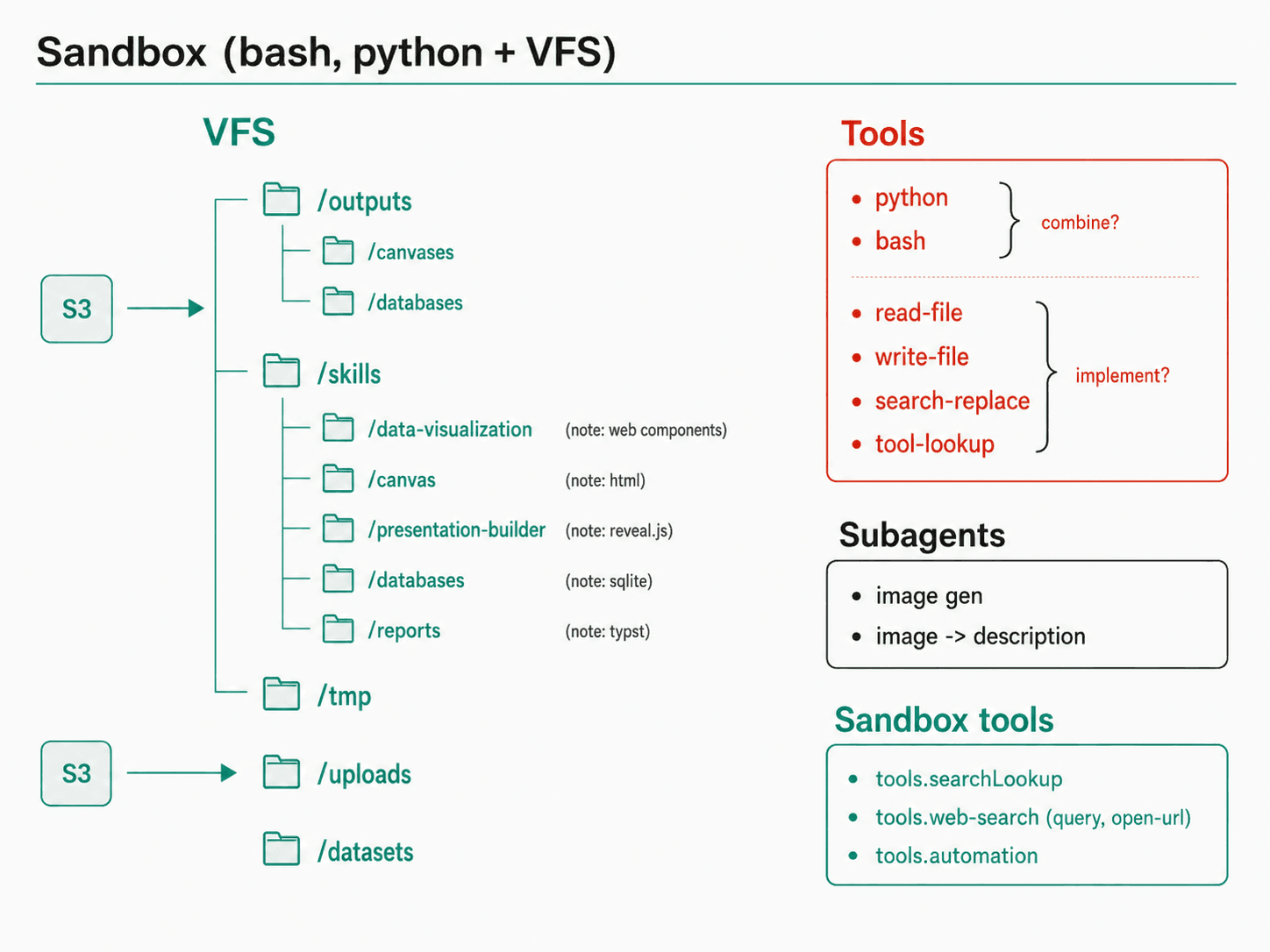
The model is not only receiving text. It can read uploaded files, write intermediate results, discover packaged skills, execute code, and save generated artifacts. The virtual filesystem gives those capabilities a shared workspace.
The exact paths and tools vary between platforms. This diagram is an architectural model, not a required filesystem standard.
Directory Roles
Each part of the filesystem has a different lifecycle and trust boundary:
| Path | Role |
|---|---|
/uploads | Files attached by a user or supplied to the current task |
/datasets | Reusable knowledge collections available to the user or assistant |
/skills | Packaged instructions, scripts, templates, and supporting resources |
/tmp | Ephemeral downloads, experiments, and intermediate files |
/outputs | Generated documents, presentations, charts, databases, and other artifacts |
For example, a user might upload a CSV into /uploads. The model can read it, use a skill from /skills to analyse it, write intermediate data into /tmp, and save a finished report under /outputs.
This shared namespace makes multi-step work possible. A command can create a file that another tool reads later, and the final artifact can be returned through the chat interface.
Files and Attachments
Attachments are one way files enter the virtual filesystem. The chat application assigns them to the current user, conversation, or task and exposes only the files that the model is permitted to access.
Text extraction or document intelligence may also make an attachment searchable without requiring the model to read the entire file. A runtime might expose operations such as:
// List files available to a conversation or task
attachment_list(scope_id: string): object[]

// Read an attachment or its extracted text
attachment_read(attachment_id: string): string

// Search indexed document content
document_search(query: string, top_k: number): object[]

// Add a generated file to the conversation
attachment_add(scope_id: string, filename: string, content: string): string
These APIs are illustrative. Some platforms expose dedicated file tools, while others let a sandbox command read the mounted paths directly.
Working with Files
A virtual filesystem usually supports a small set of familiar operations:
list(path: string): object[]
read(path: string): string
write(path: string, content: string): string
search_replace(path: string, old_text: string, new_text: string): string
Together with command execution, these operations let the model:
- Inspect the available workspace.
- Read the files relevant to the request.
- Create and update intermediate results.
- Run programs that consume or produce files.
- Check the outputs before presenting them.
- Publish selected files as artifacts.
The filesystem supplies continuity between tool calls. Without it, each operation would have to carry all of its input and output inside the conversation.
Virtual Does Not Mean Permanent
Some paths are ephemeral and disappear when the sandbox or conversation ends. Other files may be persisted to object storage and mounted again in a later session.
The runtime should make those boundaries explicit:
- temporary files should not be mistaken for durable artifacts;
- user uploads should retain their ownership and access controls;
- dataset files should only be mounted for authorised users;
- generated outputs should be published deliberately;
- credentials and sensitive host files should not appear in the workspace.
The virtual filesystem is therefore both a convenience and a security boundary. It gives the model a consistent way to work while the platform decides what can be seen, changed, retained, or shared.
From Files to Runtime Tools
The virtual filesystem gives an AI computer somewhere to keep inputs, intermediate work, and outputs. Runtime tools give the model ways to act on that workspace: it can inspect files, execute code, discover connected capabilities, and combine the results.
The next lesson examines how those runtime capabilities turn a collection of files into a programmable working environment.