From Chatbot to AI Computer
In Understanding Tool Calls, we asked a model:
What is the price of Bitcoin today in USD?
The model could not answer from its training data because the price changes constantly. We solved that problem by giving it a purpose-built tool named get_bitcoin_price_usd.
That tool adds one useful capability. If we want the model to retrieve an exchange rate, inspect a CSV, resize an image, or generate a report, we could keep adding purpose-built tools. Alternatively, we can give the model a working environment containing software that already knows how to perform many of those tasks.
This is the shift from chatbot to AI computer.
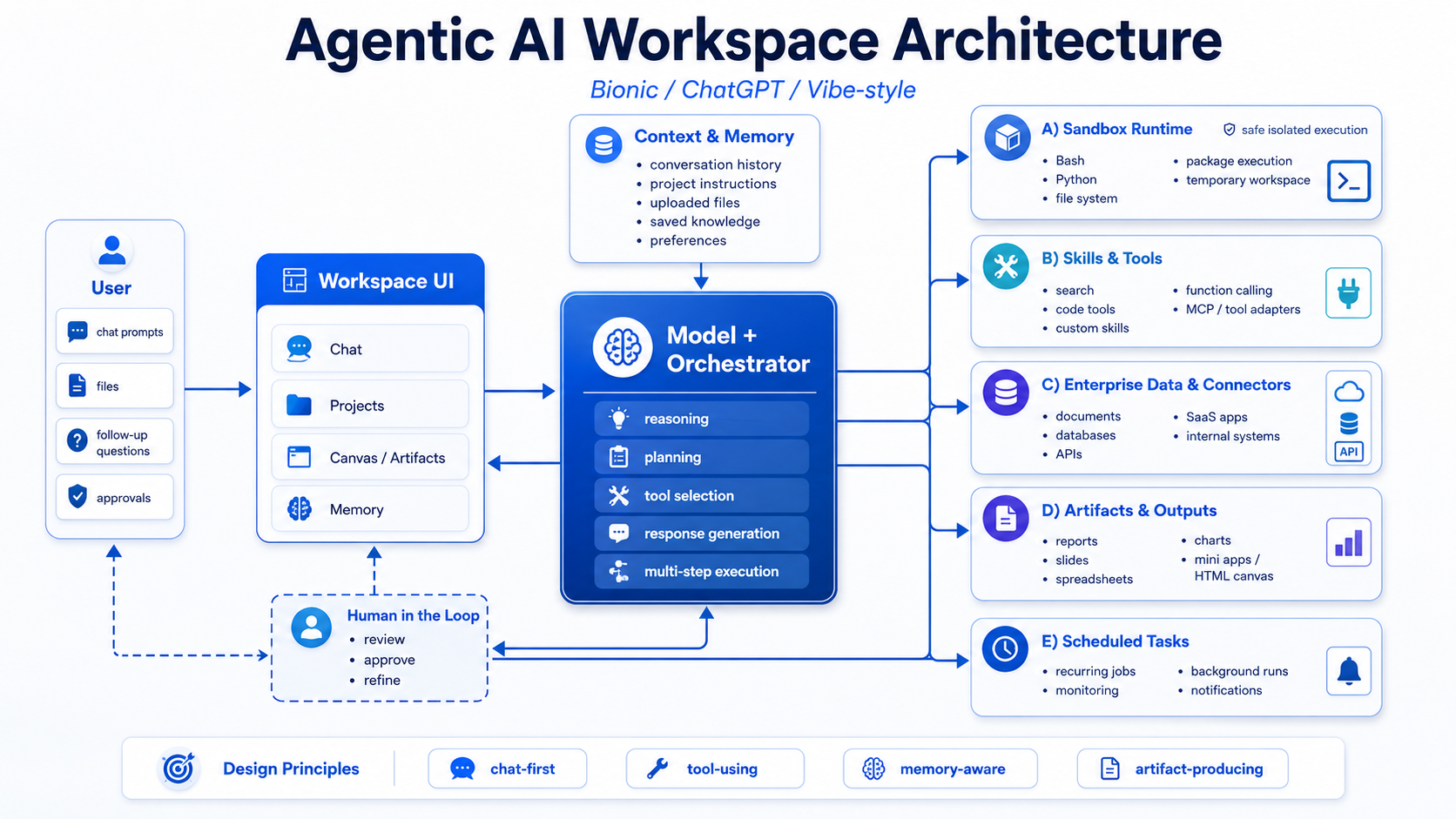
An AI computer is a conversational workspace in which a model can inspect and create files, execute commands or code, use installed tools and skills, maintain working context, connect to external systems, schedule future work, and produce finished artifacts.
Here, “AI computer” describes the software environment around the model. It does not mean AI-specific hardware, a GPU workstation, or a consumer “AI PC.”
OpenClaw made this shift easy to see. It connected the model to a workspace and tools on your computer, allowing it to read and change files, run commands, and use existing software. The model could then handle many kinds of work without a separate tool or agent being designed for every request.
Give the Model a Computer
Let us ask the Bitcoin question again. This time we will not provide a Bitcoin-specific tool. We will provide one general tool that can execute a Bash command inside an isolated environment:
{
  "type": "function",
  "function": {
    "name": "exec_bash",
    "description": "Execute a Bash command in an isolated workspace and return stdout and stderr.",
    "parameters": {
      "type": "object",
      "properties": {
        "command": {
          "type": "string",
          "description": "The Bash command to execute."
        }
      },
      "required": ["command"],
      "additionalProperties": false
    }
  }
}
The user still asks:
What is the price of Bitcoin today in USD?
The model knows that it needs current information. It also knows that curl can make an HTTP request, so it can use the general execution tool to call a public price API:
{
  "role": "assistant",
  "content": "",
  "tool_calls": [
    {
      "name": "exec_bash",
      "arguments": {
        "command": "curl --fail --silent --show-error https://api.coinbase.com/v2/prices/BTC-USD/spot"
      }
    }
  ]
}
The model does not execute this command itself. The application receives the tool call, runs the command inside the permitted sandbox, and returns stdout and stderr.
A successful command returns JSON similar to this:
{
  "data": {
    "amount": "64251.42",
    "base": "BTC",
    "currency": "USD"
  }
}
The amount above is illustrative. Bitcoin prices change continuously.
The application adds the command result to the conversation, and the model can now answer:
Bitcoin is currently trading at approximately $64,251.42 USD.
The agentic loop is the same as before: the model requests a tool, the application executes it, and the result is returned to the model. What changed is the breadth of the tool.
Minimum Tools
Mistral Vibe exposes a small set of general tools that the model can combine around the request in front of it.
Mistral Vibe
A minimum toolset
exec_bash
Run shell commands
exec_python
Execute Python
search_tool
Discover available capabilities
read_file
Inspect workspace files
write_file
Create or update files
search_replace
Make targeted edits
In the following sections, we will show how this small toolset can cover a large range of the work users ask the model to perform.
The Architecture We Will Explore
The following lessons explore how the runtime, files, tools, skills, memory, integrations, and outputs fit together around the model.